27apr2018 업데이트 : 서식 수정
동시에 여러 RunProgram 인스턴스를 사용하는 것에 대한 질문이 있습니다. 다음은 세 개의 다른 IP 주소에 대해 PING 세 개의 사본을 실행하고 결과를 세 개의 다른 데이터 테이블에 기록하는 예입니다. 이 예제에서는 "매개 변수"값을 사용하여 각 실행 프로그램에 사용할 데이터 테이블을 알리는 방법을 보여줍니다. 첨부 파일은 인라인 코드와 동일합니다 ...
// first, we'll need containers that can be indexed from 1 to NJOBS
// and hold the references to the data tables and the RunPrograms.
datatab = Associative Array();
runprog = Associative Array();
who = {"jmp.com", "google.com", "bing.com"}; // each runProgram can do something different
NJOBS = N Items( who );
// next, a loop to make tables and launch the RunPrograms
For( iJOB = 1, iJOB <= NJOBS, iJOB++,
// make a table with a text column, then make the column wide so we can see more data
datatab[iJOB] = New Table( who[iJOB], addrows( 1 ), New Column( "text", Character, Set Values( {"pinging..."} ) ) );
datatab[iJOB]:text << setdisplaywidth( 500 );
// launch the RunProgram. It is particularly important to make sure the RunProgram
// object is stored in a variable that won't be overwritten...the associative array holds it.
runprog[iJOB] = RunProgram(
Executable( "PING.EXE" ), // this is the 'job' we are running several copies of, in parallel
Options( {"-n 10", who[iJOB]} ), // run for 10 seconds --- this is a PING option
Parameter( iJOB ), // remember which "instance" this is --- this goes to the ReadFunction
ReadFunction( // define a function that will get called for lots of small snippets of text
Function( {this, myInstance}, // myInstance is the iJOB
{buffer = ""}, // local to this instance. buffer up small snippets
While( this << canread, // this reads multiple snippets that may show up in a single call
buffer = buffer || (this << read); // put the snippets together
Wait( .01 ); // this isn't really needed except to get the snippets in a single record
); // gather as much as possible
buffer = Regex( buffer, "\s+", " ", GLOBALREPLACE ); // clean up the buffer, remove CRs and LFs
If( Trim( buffer ) != "", // see if we have something to say. there are blanks in PING's output
(datatab[myInstance]) << addrow( 1 ); // my table gets a new row
(datatab[myInstance]):text = buffer; // store the cleaned up buffer
);
)
)
);
);
// if you want to, you can wait for the runprograms. They *require* JMP to be idle to make
// the callback to the read function; the following polling loop uses wait(.1) to make sure
// JMP is mostly idle. When the PING program terminates, it closes the STDOUT file handle
// JMP is listening to, causing the isReadEof message to return TRUE.
For( iJOB = 1, iJOB <= NJOBS, iJOB++,
While( !((runprog[iJOB]) << isReadEof), Wait( .1 ) )
);
Write( "All Done!\!n" ); // now you can proceed with the data tables
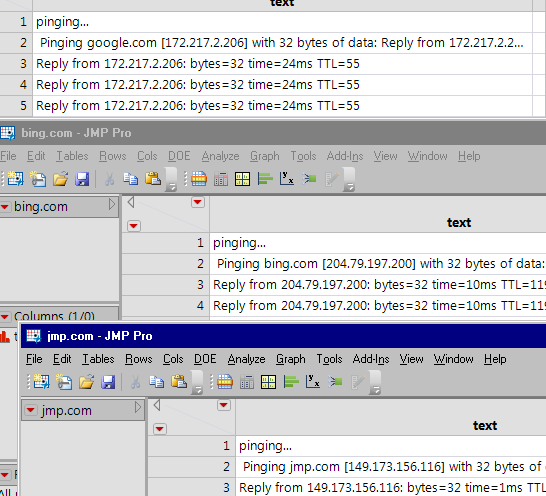
한 번에 실행할 수있는 수의 제한이 있습니다. 아마 수백이 아닙니다. 그들은 무제한이 아닌 컴퓨터의 리소스를 사용합니다.
<meta http-equiv="Content-Type" content="text/html; charset=UTF-8" />JMP 11에서는 각 RunProgram 인스턴스에 고유 한 ReadFunctions를 사용하도록 스크립트를 수정할 수 있습니다. 이 예제는 "myInstance"변수를 지역 변수 목록에 임베드하며 할당은 Eval (EvalExpr (...)로 해결됩니다. expr () ... 기구.
아래 텍스트가 지저분한 경우 화면 상단의 번역을 해제하십시오.
// 먼저, 1에서 NJOBS까지 인덱싱 할 수있는 컨테이너가 필요합니다.
// 데이터 테이블과 RunProgram에 대한 참조를 보유합니다.
datatab = 연관 배열 ();
runprog = 연관 배열 ();
who = { "jmp.com", "google.com", "bing.com"}; // 각 runProgram은 다른 것을 할 수있다.
NJOBS = N Items (누가);
// 다음으로 테이블을 만들고 RunPrograms를 시작하는 루프
(iJOB = 1, iJOB <= NJOBS, iJOB ++,
// 텍스트 열이있는 테이블을 만든 다음 열을 넓게 만들어 더 많은 데이터를 볼 수있게합니다.
datatab [iJOB] = 새 테이블 (who [iJOB], addrows (1), New Column ( "텍스트", 문자, 값 설정 ({ "pinging ..."}))));
datatab [iJOB] : 텍스트 << setdisplaywidth (500);
// RunProgram을 실행합니다. 특히 RunProgram을 확인하는 것이 중요합니다.
// 객체는 덮어 쓰지 않을 변수에 저장됩니다 ... 연관 배열은 그것을 유지합니다.
runprog [iJOB] = 평가 (
Eval Expr (
실행 프로그램 (
실행 파일 ( "PING.EXE"), // 이것은 여러 복사본을 병렬로 실행하는 '작업'입니다.
옵션 ({ "-n 10", Expr (who [iJOB])}), // 10 초 동안 실행 --- 이것은 PING 옵션입니다
// JMP 11에는 없다 : 매개 변수 (iJOB), // 어떤 "인스턴스"인지 기억한다 --- 이것은 ReadFunction
ReadFunction (// 작은 스 니펫의 많은 텍스트에 대해 호출 될 함수를 정의합니다.
함수 ({this / * JMP 11에서는 :, myInstance * /}, // myInstance는 iJOB입니다.
{buffer = "",
// JMP 11 웨이 ...
myInstance = Expr (iJOB) // evalexpr이 처리합니다.
}, //이 인스턴스의 로컬. 작은 조각 미리보기
while (이 << canread, // 이것은 단일 호출에 나타날 수있는 여러 조각을 읽습니다.
버퍼 = 버퍼 || (이 << 읽기); // 스 니펫을 함께 넣습니다.
잠깐 (.01); // 단일 레코드에서 스 니펫을 가져 오는 경우를 제외하고는 실제로 필요하지 않습니다.
); // 가능한 많이 수집하십시오.
버퍼 = Regex (버퍼, "\ s +", "", GLOBALREPLACE); // 버퍼 정리, CR 및 LF 제거
if (Trim (buffer)! = ""), // 우리가 할 말이 있는지보십시오. PING의 출력에 공백이 있습니다.
(datatab [myInstance]) << addrow (1); // 내 테이블이 새로운 행을 얻는다.
(datatab [myInstance]) : 텍스트 = 버퍼; // 정리 된 버퍼를 저장한다.
);
)
)
)
)
);
);
// 원하는 경우 실행 프로그램을 기다릴 수 있습니다. 그들은 * JMP를 유휴 상태로 만들어야합니다.
// read 함수에 대한 콜백; 다음 폴링 루프는 wait (.1)를 사용하여
// JMP는 주로 유휴 상태입니다. PING 프로그램이 종료되면 STDOUT 파일 핸들을 닫습니다
// JMP가 듣기 때문에 isReadEof 메시지가 TRUE를 반환합니다.
(iJOB = 1, iJOB <= NJOBS, iJOB ++,
while (! ((runprog [iJOB]) << isReadEof), 대기 (.1))
);
쓰기 ( "모두 완료! \! n"); // 이제 데이터 테이블을 진행할 수 있습니다.
게시 해 주셔서 감사합니다.
JMP 12 이전에는 ReadFunction의 선택적 매개 변수 (이 경우에는 myInstance)가 추가되지 않았으므로 JMP 11 이하에서는 작동하지 않는다고 추가하기 만했습니다.
많은 감사합니다!
실제로 이것을 실제로 사용하는 사람들에게는 분명하지만 Mac에서는 다음을 필요로합니다.
실행 파일 ( "/ sbin / ping" ),
옵션 ({ "-c 10" , who [iJOB]}),
