更新27apr2018:フォーマットの修復
複数のRunProgramインスタンスを同時に使用することについて質問があります。 これは、3つの異なるIPアドレスに対して3つのPINGのコピーを実行し、その結果を3つの異なるデータテーブルに記録する例です。 例では、各RunProgramにどのデータテーブルを使用するかを知らせるために "parameter"値を使用する方法を示します。 添付ファイルはインラインコードと同じです...
// first, we'll need containers that can be indexed from 1 to NJOBS
// and hold the references to the data tables and the RunPrograms.
datatab = Associative Array();
runprog = Associative Array();
who = {"jmp.com", "google.com", "bing.com"}; // each runProgram can do something different
NJOBS = N Items( who );
// next, a loop to make tables and launch the RunPrograms
For( iJOB = 1, iJOB <= NJOBS, iJOB++,
// make a table with a text column, then make the column wide so we can see more data
datatab[iJOB] = New Table( who[iJOB], addrows( 1 ), New Column( "text", Character, Set Values( {"pinging..."} ) ) );
datatab[iJOB]:text << setdisplaywidth( 500 );
// launch the RunProgram. It is particularly important to make sure the RunProgram
// object is stored in a variable that won't be overwritten...the associative array holds it.
runprog[iJOB] = RunProgram(
Executable( "PING.EXE" ), // this is the 'job' we are running several copies of, in parallel
Options( {"-n 10", who[iJOB]} ), // run for 10 seconds --- this is a PING option
Parameter( iJOB ), // remember which "instance" this is --- this goes to the ReadFunction
ReadFunction( // define a function that will get called for lots of small snippets of text
Function( {this, myInstance}, // myInstance is the iJOB
{buffer = ""}, // local to this instance. buffer up small snippets
While( this << canread, // this reads multiple snippets that may show up in a single call
buffer = buffer || (this << read); // put the snippets together
Wait( .01 ); // this isn't really needed except to get the snippets in a single record
); // gather as much as possible
buffer = Regex( buffer, "\s+", " ", GLOBALREPLACE ); // clean up the buffer, remove CRs and LFs
If( Trim( buffer ) != "", // see if we have something to say. there are blanks in PING's output
(datatab[myInstance]) << addrow( 1 ); // my table gets a new row
(datatab[myInstance]):text = buffer; // store the cleaned up buffer
);
)
)
);
);
// if you want to, you can wait for the runprograms. They *require* JMP to be idle to make
// the callback to the read function; the following polling loop uses wait(.1) to make sure
// JMP is mostly idle. When the PING program terminates, it closes the STDOUT file handle
// JMP is listening to, causing the isReadEof message to return TRUE.
For( iJOB = 1, iJOB <= NJOBS, iJOB++,
While( !((runprog[iJOB]) << isReadEof), Wait( .1 ) )
);
Write( "All Done!\!n" ); // now you can proceed with the data tables
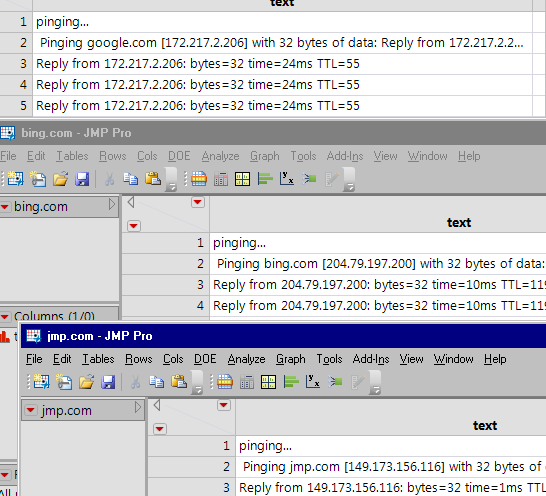
一度に実行できるこれらの数には制限があります。 おそらく数百人ではありません。彼らはあなたのコンピュータ上で無制限ではないリソースを使います。
<meta http-equiv="Content-Type" content="text/html; charset=UTF-8" />JMP 11では、RunProgramインスタンスごとに固有のReadFunctionを使用するようにスクリプトを変更できました。 この例では、"myInstance"変数をローカル変数リストに埋め込み、Eval(EvalExpr(... expr()... 機構。
(下のテキストが面倒な場合は、画面上部の翻訳をオフにしてください。)
//最初に、1からNJOBSまでインデックスを付けることができるコンテナが必要になります
//データテーブルとRunProgramsへの参照を保持します。
datatab =連想配列();
runprog =連想配列();
who = {"jmp.com"、"google.com"、"bing.com"}; //各runProgramは異なる動作をすることができます
NJOBS = Nアイテム(人)。
//次に、テーブルを作成してRunProgramsを起動するためのループ
(iJOB = 1、iJOB <= NJOBS、iJOB ++、
//テキスト列を含むテーブルを作成してから、列を広くしてデータをさらに表示できるようにする
datatab [iJOB] =新しいテーブル(who [iJOB]、addrows(1)、新しい列( "text"、文字、設定値({"pinging ..."})));
datatab [iJOB]:テキスト<< setdisplaywidth(500);
// RunProgramを起動します。 RunProgramを確実に実行することが特に重要です。
//オブジェクトは上書きされない変数に格納されます...連想配列はそれを保持します。
runprog [iJOB] = Eval(
評価指数(
RunProgram(
実行可能ファイル( "PING.EXE")//これは、複数のコピーを並行して実行している 'ジョブ'です。
Options({"-n 10"、Expr(who [iJOB])})// // 10秒間実行---これはPINGオプションです
// JMP 11にはありません:パラメータ(iJOB)、//これはどの「インスタンス」であるかを覚えています---これはReadFunctionに行きます
ReadFunction(//たくさんの小さなテキストの断片のために呼ばれる関数を定義する
関数({this / * JMP 11にはない:、myInstance * /}、// myInstanceはiJOBです
{buffer = ""、
// JMP 11の方法
myInstance = Expr(iJOB)// evalexprがこれを処理します。
//このインスタンスに対してローカルです。小さな断片をバッファリングする
while(this << canread、//これは一回の呼び出しで現れるかもしれない複数の断片を読む
buffer = buffer || (これは<< read); //スニペットをまとめる
待つ(0.01) //これは、1つのレコードにスニペットを入れること以外は本当に必要ではありません
; //できるだけ多く集める
buffer = Regex(buffer、"\ s +"、""、GLOBALREPLACE); //バッファをクリーンアップし、CRとLFを削除する
If(Trim(buffer)!= ""、//言いたいことがあるかどうかを確認してください。 PINGの出力に空白があります
(datatab [myInstance])<< addrow(1); //私のテーブルは新しい行を取得します
(datatab [myInstance]):text = buffer; //クリーンアップしたバッファを保存する
;
)
)
)
)
;
;
//必要に応じて、実行プログラムを待つことができます。 彼らは*作るためにアイドル状態であることをJMPに要求します
// read関数へのコールバック次のポーリングループは、確認のためにwait(.1)を使用します。
// JMPはほとんどアイドル状態です。 PINGプログラムは、終了するとSTDOUTファイルハンドルを閉じます。
// JMPはリスンしているため、isReadEofメッセージはTRUEを返します。
(iJOB = 1、iJOB <= NJOBS、iJOB ++、
((!((runprog [iJOB])<< isReadEof)、((.1))を待つ)
;
書いて( "All Done!\!n"); //これでデータテーブルに進むことができます
これを投稿してくれてありがとう!
ReadFunctionのオプションのパラメータ(この場合はmyInstance)はJMP 12まで追加されなかったため、JMP 11(およびそれ以前)ではこれが機能しないことを付け加えたいと思います。
どうもありがとう!
実際にこれを使用する人にはおそらく明らかですが、Macでは次のものが必要になります。
実行可能ファイル( "/ sbin / ping" 、
オプション({ " - c 10" 、誰[iJOB]})、
