aggiornamento 27apr2018: ripara la formattazione
Ho appena ricevuto una domanda sull'utilizzo di più istanze di RunProgram contemporaneamente. Ecco un esempio che esegue tre copie di PING contro tre diversi indirizzi IP e registra i risultati in tre diverse tabelle di dati. L'esempio mostra come usare il valore "parametro" per far sì che ciascun RunProgram sappia quale tabella dati usare. L'allegato è uguale al codice inline ...
// first, we'll need containers that can be indexed from 1 to NJOBS
// and hold the references to the data tables and the RunPrograms.
datatab = Associative Array();
runprog = Associative Array();
who = {"jmp.com", "google.com", "bing.com"}; // each runProgram can do something different
NJOBS = N Items( who );
// next, a loop to make tables and launch the RunPrograms
For( iJOB = 1, iJOB <= NJOBS, iJOB++,
// make a table with a text column, then make the column wide so we can see more data
datatab[iJOB] = New Table( who[iJOB], addrows( 1 ), New Column( "text", Character, Set Values( {"pinging..."} ) ) );
datatab[iJOB]:text << setdisplaywidth( 500 );
// launch the RunProgram. It is particularly important to make sure the RunProgram
// object is stored in a variable that won't be overwritten...the associative array holds it.
runprog[iJOB] = RunProgram(
Executable( "PING.EXE" ), // this is the 'job' we are running several copies of, in parallel
Options( {"-n 10", who[iJOB]} ), // run for 10 seconds --- this is a PING option
Parameter( iJOB ), // remember which "instance" this is --- this goes to the ReadFunction
ReadFunction( // define a function that will get called for lots of small snippets of text
Function( {this, myInstance}, // myInstance is the iJOB
{buffer = ""}, // local to this instance. buffer up small snippets
While( this << canread, // this reads multiple snippets that may show up in a single call
buffer = buffer || (this << read); // put the snippets together
Wait( .01 ); // this isn't really needed except to get the snippets in a single record
); // gather as much as possible
buffer = Regex( buffer, "\s+", " ", GLOBALREPLACE ); // clean up the buffer, remove CRs and LFs
If( Trim( buffer ) != "", // see if we have something to say. there are blanks in PING's output
(datatab[myInstance]) << addrow( 1 ); // my table gets a new row
(datatab[myInstance]):text = buffer; // store the cleaned up buffer
);
)
)
);
);
// if you want to, you can wait for the runprograms. They *require* JMP to be idle to make
// the callback to the read function; the following polling loop uses wait(.1) to make sure
// JMP is mostly idle. When the PING program terminates, it closes the STDOUT file handle
// JMP is listening to, causing the isReadEof message to return TRUE.
For( iJOB = 1, iJOB <= NJOBS, iJOB++,
While( !((runprog[iJOB]) << isReadEof), Wait( .1 ) )
);
Write( "All Done!\!n" ); // now you can proceed with the data tables
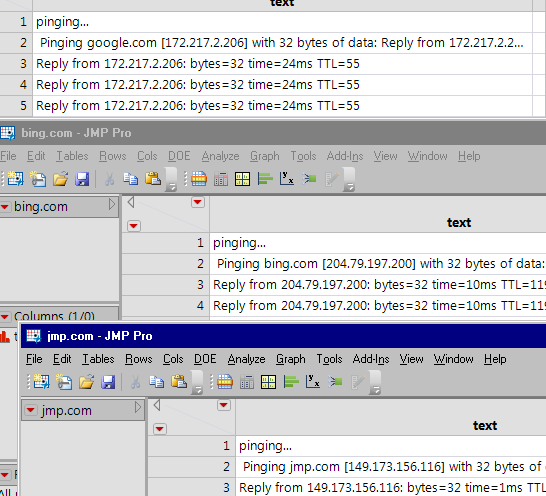
C'è un limite a quanti di questi è possibile eseguire contemporaneamente. Probabilmente non centinaia; usano risorse sul tuo computer che non sono illimitate.
<meta http-equiv="Content-Type" content="text/html; charset=UTF-8" />In JMP 11, è possibile modificare lo script per utilizzare ReadFunctions univoci per ogni istanza di RunProgram. Questo esempio incorpora la variabile "myInstance" nell'elenco delle variabili locali, con un compito risolto da Eval (EvalExpr (... expr () ... meccanismo.
(Disattiva la traslazione nella parte superiore dello schermo se il testo sottostante è disordinato).
// primo, avremo bisogno di contenitori che possano essere indicizzati da 1 a NJOBS
// e mantieni i riferimenti alle tabelle di dati e ai RunPrograms.
datatab = Array associativo ();
runprog = Array associativo ();
who = {"jmp.com", "google.com", "bing.com"}; // ogni runProgram può fare qualcosa di diverso
NJOBS = N Articoli (chi);
// next, un loop per creare tabelle e lanciare i RunPrograms
Per (iJOB = 1, iJOB <= NJOBS, iJOB ++,
// crea una tabella con una colonna di testo, quindi allarga la colonna in modo da poter vedere più dati
datatab [iJOB] = New Table (who [iJOB], addrows (1), New Column ("text", Character, Set Values ({"pinging ..."})));
datatab [iJOB]: testo << setdisplaywidth (500);
// avvia il RunProgram. È particolarmente importante assicurarsi che RunProgram
// l'oggetto è memorizzato in una variabile che non verrà sovrascritta ... l'array associativo la tiene.
runprog [iJOB] = Eval (
Eval Expr (
Eseguire il programma(
Eseguibile ("PING.EXE"), // questo è il 'lavoro' su cui eseguiamo diverse copie, in parallelo
Opzioni ({"-n 10", Espr (chi [iJOB])}), // esegue per 10 secondi --- questa è un'opzione PING
// non in JMP 11: Parametro (iJOB), // ricorda quale "istanza" è --- questo va alla ReadFunction
ReadFunction (// definisce una funzione che verrà chiamata per molti piccoli snippet di testo
Funzione ({questo / * non in JMP 11:, myInstance * /}, // myInstance è l'iJOB
{buffer = "",
// il modo JMP 11 ...
myInstance = Expr (iJOB) // evalexpr si occupa di questo
}, // locale a questa istanza. buffer di piccoli frammenti
Mentre (questo << canread, // legge più snippet che possono apparire in una singola chiamata
buffer = buffer || (questo << leggi); // metti insieme i frammenti
Attendere (.01); // questo non è veramente necessario se non per ottenere i frammenti in un singolo record
); // raccogli il più possibile
buffer = Regex (buffer, "\ s +", "", GLOBALREPLACE); // ripulire il buffer, rimuovere CR e LF
Se (Trim (buffer)! = "", // vedi se abbiamo qualcosa da dire. ci sono spazi vuoti nell'output di PING
(datatab [myInstance]) << addrow (1); // il mio tavolo ottiene una nuova riga
(datatab [myInstance]): text = buffer; // memorizza il buffer ripulito
);
)
)
)
)
);
);
// se vuoi, puoi aspettare i programmi run. Loro * richiedono * JMP per essere inattivo da fare
// il callback alla funzione di lettura; il seguente ciclo di polling utilizza wait (.1) per essere sicuro
// JMP è in gran parte inattivo. Quando termina il programma PING, chiude l'handle del file STDOUT
// JMP sta ascoltando, facendo sì che il messaggio isReadEof restituisca TRUE.
Per (iJOB = 1, iJOB <= NJOBS, iJOB ++,
Mentre (! ((Runprog [iJOB]) << isReadEof), Wait (.1))
);
Scrivi ("All Done! \! N"); // ora puoi procedere con le tabelle di dati
Grazie molto!
Forse ovvio per chi lo userebbe, ma su un Mac ti occorrerebbe:
Executable ( "/ Sbin / ping" ),
Opzioni( { "-c 10" , chi [iJOB]}),
