2018 年 4 月 27 日更新:修復格式化
剛收到一個關於同時使用多個 RunProgram 實例的問題。這是一個示例,它針對三個不同的 IP 地址運行三個 PING 副本,並將結果記錄在三個不同的數據表中。該示例顯示瞭如何使用“參數”值使每個 RunProgram 知道要使用哪個數據表。附件與內聯代碼相同...
// first, we'll need containers that can be indexed from 1 to NJOBS
// and hold the references to the data tables and the RunPrograms.
datatab = Associative Array();
runprog = Associative Array();
who = {"jmp.com", "google.com", "bing.com"}; // each runProgram can do something different
NJOBS = N Items( who );
// next, a loop to make tables and launch the RunPrograms
For( iJOB = 1, iJOB <= NJOBS, iJOB++,
// make a table with a text column, then make the column wide so we can see more data
datatab[iJOB] = New Table( who[iJOB], addrows( 1 ), New Column( "text", Character, Set Values( {"pinging..."} ) ) );
datatab[iJOB]:text << setdisplaywidth( 500 );
// launch the RunProgram. It is particularly important to make sure the RunProgram
// object is stored in a variable that won't be overwritten...the associative array holds it.
runprog[iJOB] = RunProgram(
Executable( "PING.EXE" ), // this is the 'job' we are running several copies of, in parallel
Options( {"-n 10", who[iJOB]} ), // run for 10 seconds --- this is a PING option
Parameter( iJOB ), // remember which "instance" this is --- this goes to the ReadFunction
ReadFunction( // define a function that will get called for lots of small snippets of text
Function( {this, myInstance}, // myInstance is the iJOB
{buffer = ""}, // local to this instance. buffer up small snippets
While( this << canread, // this reads multiple snippets that may show up in a single call
buffer = buffer || (this << read); // put the snippets together
Wait( .01 ); // this isn't really needed except to get the snippets in a single record
); // gather as much as possible
buffer = Regex( buffer, "\s+", " ", GLOBALREPLACE ); // clean up the buffer, remove CRs and LFs
If( Trim( buffer ) != "", // see if we have something to say. there are blanks in PING's output
(datatab[myInstance]) << addrow( 1 ); // my table gets a new row
(datatab[myInstance]):text = buffer; // store the cleaned up buffer
);
)
)
);
);
// if you want to, you can wait for the runprograms. They *require* JMP to be idle to make
// the callback to the read function; the following polling loop uses wait(.1) to make sure
// JMP is mostly idle. When the PING program terminates, it closes the STDOUT file handle
// JMP is listening to, causing the isReadEof message to return TRUE.
For( iJOB = 1, iJOB <= NJOBS, iJOB++,
While( !((runprog[iJOB]) << isReadEof), Wait( .1 ) )
);
Write( "All Done!\!n" ); // now you can proceed with the data tables
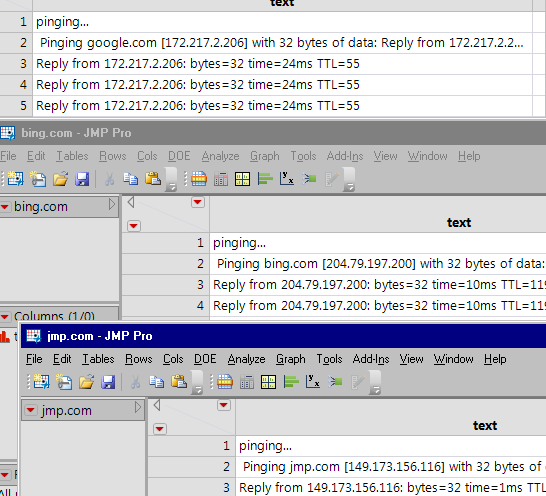
您一次可以運行的數量是有限的。可能不是數百;他們使用您計算機上的資源不是無限的。
<meta http-equiv="Content-Type" content="text/html; charset=UTF-8" />在 JMP 11 中,您可以修改腳本以對每個 RunProgram 實例使用唯一的 ReadFunction。此示例將“myInstance”變量嵌入到局部變量列表中,賦值由 Eval( EvalExpr( ... expr() ... 機制解決。
(如果下面的文字亂七八糟,請關閉屏幕頂部的翻譯。)
// 首先,我們需要可以從 1 索引到 NJOBS 的容器
// 並保存對數據表和 RunPrograms 的引用。
datatab = 關聯數組();
runprog = 關聯數組();
誰= {“jmp.com”,“google.com”,“bing.com”}; // 每個 runProgram 可以做不同的事情
NJOBS = N 項(誰);
// 接下來,創建表格並啟動 RunPrograms 的循環
對於(iJOB = 1,iJOB <= NJOBS,iJOB++,
// 製作一個帶有文本列的表格,然後使列變寬以便我們可以看到更多數據
datatab[iJOB] = New Table(who[iJOB], addrows(1), New Column("text", Character, Set Values({"pinging..."} ) ) );
datatab[iJOB]:text << setdisplaywidth( 500 );
// 啟動運行程序。確保 RunProgram 尤為重要
// 對象存儲在一個不會被覆蓋的變量中......關聯數組保存它。
runprog[iJOB] = 評估(
評估表達式(
運行程序(
Executable( "PING.EXE" ), // 這是我們正在並行運行多個副本的“作業”
Options( {"-n 10", Expr( who[iJOB] )} ), // 運行 10 秒 --- 這是一個 PING 選項
// 不在 JMP 11 中:Parameter( iJOB ), // 記住這是哪個“實例” --- 這轉到 ReadFunction
ReadFunction( // 定義一個函數,該函數將被大量小文本片段調用
Function( {this/* not in JMP 11: , myInstance*/}, // myInstance 是 iJOB
{緩衝區=“”,
// JMP 11 方式...
myInstance = Expr( iJOB ) // evalexpr 負責這個
}, // 此實例本地。緩衝小片段
While( this << canread, // this 讀取可能在單個調用中出現的多個片段
緩衝區 = 緩衝區 || (這 << 讀); // 將片段放在一起
等待( .01 ); // 除了在單個記錄中獲取片段之外,這並不是真正需要的
); // 盡可能收集
緩衝區 = 正則表達式(緩衝區,“\s+”,“”,GLOBALREPLACE); // 清理緩衝區,移除 CR 和 LF
If( Trim( buffer ) != "", // 看看我們是否有話要說。PING 的輸出中有空格
(datatab[myInstance]) << addrow(1); // 我的表有一個新行
(datatab[myInstance]):text = 緩衝區; // 存儲清理後的緩衝區
);
)
)
)
)
);
);
// 如果你願意,你可以等待運行程序。他們*要求* JMP 閒置
// 讀取函數的回調;以下輪詢循環使用 wait(.1) 來確保
// JMP 大多是空閒的。當 PING 程序終止時,它會關閉 STDOUT 文件句柄
// JMP 正在偵聽,導致 isReadEof 消息返回 TRUE。
對於(iJOB = 1,iJOB <= NJOBS,iJOB++,
While( !((runprog[iJOB]) << isReadEof), Wait( .1 ) )
);
寫(“全部完成!\!n”); // 現在你可以繼續處理數據表了
感謝您發布此信息!
我只是想補充一點,這在 JMP 11(及更早版本)中不起作用,因為 ReadFunction 上的可選參數(在本例中為 myInstance)直到 JMP 12 才添加。
非常感謝!
對於那些實際使用它的人來說可能很明顯,但在 Mac 上你需要:
可執行文件( “/sbin/平” ),
選項( { “-c 10” , 誰[iJOB]} ),
