Columns Manager and JSLDoes anyone know if there is a way to create the same style of table box as in Columns Manager via JSL? The collapsible columns in the table box would be great to include in some reports, but I can't find how to do this in JSL.

The Tree Structure indicates a Col Span Box, but I cannot find any examples in the Scripting Index with a collapsible toggle. Is there another name for this type of table box?

If you try to Show Properties using right click within the table box, nothing happens, so I haven't been able to get any additional information.
Anyone know if this is even possible via JSL?
Re: Columns Manager and JSLYou can mimic this with a popup box, except that the icon is different. Maybe there's a way to map a new icon onto the popup box?


Names Default To Here( 1 );
New Window( "test",
	Table Box(
		Col Span Box(
			"Col Span",
			Number Col Box( "", {1, 2, 3} ),
			Col Box ( "",
				Popup Box( {"x", ex = 1, "y", ex = 2} ),
				Popup Box( {"x", ex = 1, "y", ex = 2} ),
				Popup Box( {"x", ex = 1, "y", ex = 2} )
			)
		),
		string col box ("ABC", {"a", "b", "c"})
	)
);Re: Columns Manager and JSL(disregard--I only looked at your second screenshot and answered the wrong question)
Re: Columns Manager and JSLI think they are just Outline Boxes with some sneaky scripting.

Here's an example script:
New Window( "test",
	Outline Box( "test",
		Table Box(
		Col Span Box(
			"Col Span",
			Number Col Box( "", {1, 2, 3} ),
			Col Box ( "",
				Popup Box( {"x", ex = 1, "y", ex = 2} ),
				Popup Box( {"x", ex = 1, "y", ex = 2} ),
				Popup Box( {"x", ex = 1, "y", ex = 2} )
			)
		),
		string col box ("ABC", {"a", "b", "c"}),
		<< set column borders (1),
		<< set row borders (1)
	)
	)
);Re: Columns Manager and JSLI like the idea with the outline boxes as a workaround. By making the close orientation horizontal you can start to replicate the functionality.
Re: Columns Manager and JSLIf you set the visibility for an item to be collapsed, it will take up no space, but still be there. Looks like it works with the table col boxes like the other objects in the display tree. I'm not sure about the buttons, but that would hide things the way you're after:

There might also be something to looking into summary behavior settings.
Best,
M
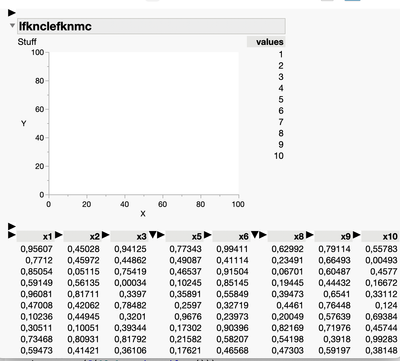
Re: Columns Manager and JSLI've attached a script with an example of a function that applies this functionality to a display box using mousetrap-driven mini graphs and an AA to keep track of things.
Like Cols Manager, when you collapse something, you just see a triangle... it is not clear what's been collapsed. Pros and cons to that.
The idea seems like it should work on most boxes that have a visibility property (like Mike mentioned) but I've not tried it on everything. It seemed a little wonky with a series of Panel Boxes, I think that is actually some sort of bug,
Setting the background color of the mini-graphs appropriately would up the aesthetics a bit.
Cheers,
B.
Re: Columns Manager and JSL@brady_brady @MikeD_Anderson
Thanks for the ideas and the starter script! Will take a look and see if it will work for what I have in mind. I have never used mouse trap boxes, so will be fun to try them out.
Re: Columns Manager and JSLThought it would be worth it to put this in as a wishlist item. Kudo's are welcome: https://community.jmp.com/t5/Internal-Wish-List/Enable-Column-Collapse-for-Table-Box-Column-Tab-Box-etc/idi-p/821082#M1319
Re: Columns Manager and JSL@brady_brady
With a few minor tweaks to the starter script, I got what I was looking for. Thanks again, would never have been able to get here without your help!

