How to account for redundant rowsI have the following table. I want to only select the last unique entries in column 1. In other words, I want to make a subset with only the highlighted rows. How do I do that?

Automation and ScriptingBasic Data Analysis and ModelingWindowsRe: How to account for redundant rowsOne option is to use a script like
Current Data Table() << Select Where(Row() == Col Max(Row(), :Column 1))
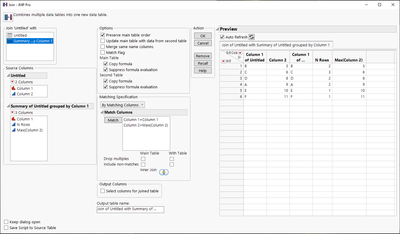
Re: How to account for redundant rowsAnd if you just need those you can use Summary

and then perform a join with this to the original table (if there is more information you need) to drop columns which do not match
Re: How to account for redundant rowsAnd one more option is to use select duplicate. First you have to sort your data by Column 2 so you get the "latest" value as first (you might have to add row column to your data unless you nothing else to use to sort)

Then select Column 1 and use Select Duplicate Rows

You should now have the rows selected you wish to drop

You can then delete these or right click on rows and invert selection

Now you should have the rows you wish to have selected. You can also sort while having the selection if you wish to, but it will then select values from the Column 2

All of these different options have their own place.
