Exactly Recreate a new window() in its exact state<meta http-equiv="Content-Type" content="text/html; charset=UTF-8" />I'm creating a dynamic new window() with x amount of tabs and charts (other stuff). Is there anything like Eval(dt << Get Script) that will recreate the window exactly? Keeping all buttons functions fully intact and knowing where I was effectively.
Right now if I do it, I can't even get it to create using the eval(nw<
Edit* Just to be clear. I'm trying to recreate a window without knowing exactly what's inside of it. This is the example I came up with to show what I'm talking about:
Names default to here(14);
cwd = convert file path("./");
New window("Test",
Hlistbox(
tb = tabbox(
"Tab1",
Panelbox("Tab 1",
lb = listbox(filesindirectory("$SAMPLE_DATA")),
buttonbox("Open",
file = (lb << Get Selected)[1];
dt = Open("$SAMPLE_DATA\"||file)
)
),
)
),
Hlistbox(
Buttonbox("Back", tb<<Set Selected((tb << Get Selected)-1)),
Buttonbox("Next",
newtab = Eval(other_boxes[(tb<<Get Selected)]);
tb<<Append("Tab", newtab);
tb<<Set Selected((tb<<GetSelected)+1)
)
)
);
other_boxes = {
PanelBox("Blank, because ... reasons?"),
PanelBox("Column Names",
Collistbox(dt, all)
)
};
It seems the general concensus is no. So I'll just mark it as answered.
Re: Exactly Recreate a new window() in its exact stateThanks you. Enjoy.
Re: Exactly Recreate a new window() in its exact stateSorry, I was being facetious. I knew you weren't creating a video game.
Next, my example shows a methodology and is stand alone. I didn't create a magic button for you. You can't just steal a methodology. It makes me laugh that you thought you could just throw my code into yours code and expect it to work. But to answer you, the windows on the right never change, and it looks like the code is replicating that window exactly every time. You'd need to compare top to bottom.
I'm not paid to help people on these forum's and I'm out of patience. I'd suggest you go back, actually read the code and understand what it's doing. I hope you the best.
Re: Exactly Recreate a new window() in its exact stateThanks, it's useful but it only gets the selected values from it. I'm looking more for a duplication of the window itself.
Re: Exactly Recreate a new window() in its exact stateNope, not creating a video game. Hence the word analogous. Here's an example :
Names default to here(14);
cwd = convert file path("./");
New window("Test",
Hlistbox(
tb = tabbox(
"Tab1",
Panelbox("Tab 1",
lb = listbox(filesindirectory("$SAMPLE_DATA")),
buttonbox("Open",
file = (lb << Get Selected)[1];
dt = Open("$SAMPLE_DATA\"||file)
)
),
),
Buttonbox("Recreate",
tabCounter = 1;
text_list = {""};
include(cwd||"/recreateWindow2.jsl")
)
),
Hlistbox(
Buttonbox("Back", tb<<Set Selected((tb << Get Selected)-1)),
Buttonbox("Next",
newtab = Eval(other_boxes[(tb<<Get Selected)]);
tb<<Append("Tab", newtab);
tb<<Set Selected((tb<<GetSelected)+1)
)
)
);
other_boxes = {
PanelBox("Blank, because ... reasons?"),
PanelBox("Column Names",
Collistbox(dt, all)
)
};
Now when I run this I get something like this when I run next to what I get when I press recreate.
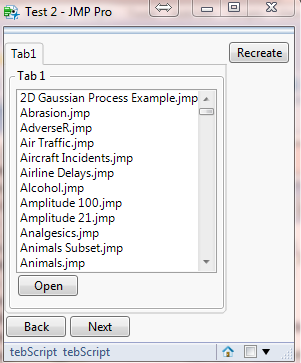
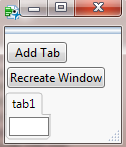
Here's after I select a data table and open it then press next.
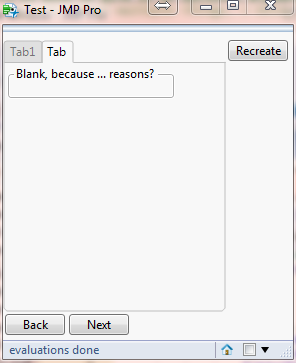
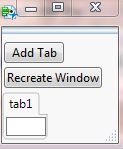
Here's when I press next again.
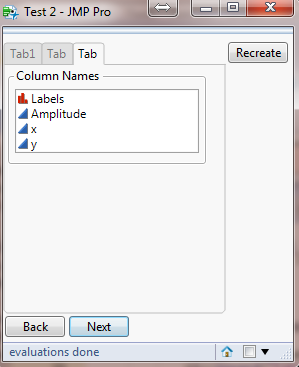
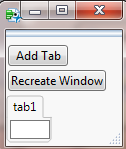
Now I'd have you mark the differences between the left and right images. When I say this doesn't work, it's because I tried it. Unless I am misunderstanding what you call working or how to use your script. But my expectation is that the right should look exactly like the left (assuming I've opened the proper data tables). Not only that but all the buttons in all the tabs should also work.
Re: Exactly Recreate a new window() in its exact stateI'm sorry, I didn't realize you were building a video game. As such, I'd recommend to first focus on building the game engine, it would be a simple matter after that to build into it save states.
For others reading this forum that want a simpler way to recreate a window and also don't understand the methodology. I've attached a more complex example that demonstrates the robustness and simplicity.
You'll run recreateWindow.jsl which will prompt you for the path to recreateWindow2.jsl.
Let me know if you any questions running these files.
Re: Exactly Recreate a new window() in its exact stateI don't know if you've ever used emulators at all for old nintendo games or not, but this uses something called a save state which is analogous to this.
What I want is a save state. Something that saves exactly what level I am on, where I am on the screen, etc. Telling me to just restart the game is not what I'm looking for.
This method solves a different problem. I don't see how that's helpful to this.
Agree to disagree I guess. I meant no offense. Sorry for not explaining myself correctly originally.
Re: Exactly Recreate a new window() in its exact stateIf you have something that works, I'm not going to push further. But let me clarify on what you said above.
This METHOD does work for you because user supplied information in tab 1 will be given to create tab 4 (or whatever tab).
If you just rerun the script, the user will have to go through the tabs 1-3 to get back to tab 4 where they were. This is true, but this wouldn't be applying THE METHOD , this would only be applying the example.
"Right now I'm having to create a script that pulls in all the necessary functions and save that to a jsl (pretty similar to what you're saying except I have to create it on the fly)."
Why do you have to create it on the fly if it's already created? AKA, you have a script that can build it once, why build a second script to build it twice?
Re: Exactly Recreate a new window() in its exact stateMy apologies, I must have stated my problem wrong. This method doesn't work for me because user supplied information in tab 1 will be given to create tab 4 (or whatever tab). If I just rerun the script, the user will have to go through the tabs 1-3 to get back to tab 4 where they were. And the tabs aren't specified, they can be anything. Right now I'm having to create a script that pulls in all the necessary functions and save that to a jsl (pretty similar to what you're saying except I have to create it on the fly), It's just slightly obfuscating is all. I'll deal if there's not a better way. Thank you.
Re: Exactly Recreate a new window() in its exact stateI have written a script that captures which tab was selected as well as the values of Text Edit Boxes, Number Edit Boxes, Combo Boxes, and List Boxes and stores them in a global 2-dimensional array when the window closes. When the window opens, the values are set to the values captured when the window was closed.
I have included an example window in the script to show the functionality, but the getValues and setValues functions are what is used to capture the state and reset the state when the script is run again.
Limitations:
1. This code does not take into account any dynamically created display boxes. You would need to adjust the code to account for that.
2. This code does not re-run any of your platforms. You can adjust the code as necessary to do that.
3. When you close JMP, the state is lost. You can, however, save the array in a text file rather than a global variable and the values can be retrieved across all instances of JMP.
4. I have not implemented check boxes in this script (and any other display boxes that I am forgetting).
The script is attached.
Let me know if you have any questions about the script.
Re: Exactly Recreate a new window() in its exact stateI'm not sure what to tell you. My solution recreates the window exactly, keeping all button functions fully intact and can know which tab you're on and everything asked for in the OP.
Plus, Eval(nw<Re: Exactly Recreate a new window() in its exact state
I am creating it with a script but the user will choose what they want the window to look like (which data tables to open, etc). And if I'm on tab(2) when I press save state, I want to be able to open back into save state, with tab(2) currently selected and all reports and tables open to the same position. Right now I am creating (trying to create) a function to pull all of the relevant functions into a string and then just eval(parse())ing it. It leaves itself open to my mistakes a lot more than something simple like Eval(nw<Re: Exactly Recreate a new window() in its exact state
I assume you created the dynamic window with a script. In which case you could just have the button run the script again.
names default to here(1);
dt=open("$SAMPLE_DATA/Big Class.jmp");
nw=New Window("test",vlistbox("the script",
Bivariate( Y( :height ), X( :weight ) );
Distribution(
Continuous Distribution(
Column( :height ),
Customize Summary Statistics( Mean( 0 ) )
),
Continuous Distribution(
Column( :weight ),
Customize Summary Statistics( Mean( 0 ) )
)
);
button box("Recreate Window",
include("path\to\this\script\recreateWindow.jsl");
)
)
);
Re: Exactly Recreate a new window() in its exact stateYou'd be correct in that a session script isn't what I want. If I try that, all it does is open the data table I have open. It doesn't even try to create a new window().
Also, I tried the eval(nw<well and it makes sense why it doesn't work, I was just hoping that there would be an easy solution rather than me having to recreate everything if I don't know what everything will be.
I'll keep hope alive a little while longer.
Just to clarify what I'm asking for:
box1 = PanelBox("1", teb = Text Edit Box("This is a test"), ButtonBox("Print", print(teb<<Get Text)));
box2 = PanelBox("2", teb = Text Edit Box("This is a test"), ButtonBox("Print", print((teb<<Get Text)||" Charlie")));
box3 = PanelBox("3", teb = Text Edit Box("This is a test"), ButtonBox("Print", print((teb<<Get Text)||" Susie")));
nw = New Window("Example",
tb = TabBox()
);
stuff = Evallist({box1, box3});
for(i=1, i<=nitems(stuff), i++,
tb<<Append(char(i), stuff)
);
nw<<Get Script
/* returns
V List Box(
V List Box(
Tab Box(
Tab Page Box(
Title( "1" ),
Panel Box( Text Edit Box( "This is a test" ), ButtonBox )
),
Tab Page Box(
Title( "2" ),
Panel Box( Text Edit Box( "This is a test" ), ButtonBox )
)
)
)
)
*/
It doesn't have window title, or the scripts for the buttonbox. Also, just won't run.
Re: Exactly Recreate a new window() in its exact stateUnfortunately, "A Session Script will catch most features" does not appear to capture what Vince desires. The dynamic Tab Boxes are not handled well. In a modified version of my above script, I ran it, and then saved the session script, and then examined it. The Tab Boxes are not carried forward to the Session Script.
Initial script
Names Default To Here( 1 );
dt = Open( "$SAMPLE_DATA/big class.jmp" );
New Window( "test", Tab Box( "tab 1", vlb = V List Box() ) );
If( Mod( Day( Today() ), 2 ) == 0,
x1 = V List Box(
Tab Box(
"Bivariate First",
biv = Bivariate( Y( :height ), X( :weight ) ),
dist = Distribution( Nominal Distribution( Column( :age ) ) )
)
),
x1 = V List Box(
Tab Box(
"Distribution First",
dist = Distribution( Nominal Distribution( Column( :age ) ) ),
biv = Bivariate( Y( :height ), X( :weight ) );
)
)
);
vlb << append( x1 );
The Session Script
Open( "C:\Program Files\SAS\JMPPRO\12\Samples\Data\Big Class.jmp", window bounds( 275, 484, 1288, 1141 ) );
New Window( "test",
V List Box(
Distribution( Nominal Distribution( Column( :age ) ) ),
Bivariate( Y( :height ), X( :weight ) )
)
) << Move Window( 722, 15 ) << Size Window( 488, 1025 ) << Set Window Icon( "ReportFile" );
Re: Exactly Recreate a new window() in its exact stateA Session Script will catch most features of your custom reports and interactive changes, including a compound report like in Jim's example. But it will also save code for recreating other windows and tables that you may not care about.
You can save a session script at any time from the File menu.
It can also be set in the preferences to always save a session script when exiting JMP.
Re: Exactly Recreate a new window() in its exact stateWhile JMP very nicely can create a script to recreate any individual platform, it does not carry that forward to user created display windows that are made up of those platforms.
The script below is a very simple example that illustrates that JMP DOES NOT create usable scripts from user defined display windows.
names default to here(1);
dt=open("$SAMPLE_DATA/Big Class.jmp");
nw=New Window("test",tab box("the script",
Bivariate( Y( :height ), X( :weight ) );
Distribution(
Continuous Distribution(
Column( :height ),
Customize Summary Statistics( Mean( 0 ) )
),
Continuous Distribution(
Column( :weight ),
Customize Summary Statistics( Mean( 0 ) )
)
);
)
);
rr=nw<<get script;
show(rr);
eval(rr);
