如何在 Tabulate 中将列居中?大家好!
我是一名新用户,想知道在使用“制表”功能时是否可以将列居中。
我尝试过:
- 突出显示/右键单击
- 将属性调整至“中心”
- 查看格式设置
- 在“设置格式(统一格式(10, 1))”中输入“center”,并添加“,center”
- 查看我的整体 JMP 偏好设置-->表格
谢谢你!
大规模定制Re: 如何在 Tabulate 中居中列?所以我找到了一个解决方法。表格框及其 StringColBox() 列确实允许对齐。下面是一个显示概念的示例脚本。
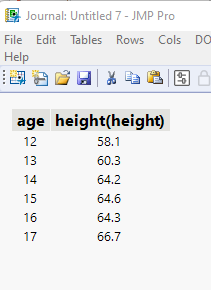
names default to here(1);
dt=// Open Data Table: big class.jmp
// → Data Table( "big class" )
Open( "$SAMPLE_DATA/big class.jmp" );

// Create the Tabulate Table, and save it as a data table
(tab = dt << Tabulate(
 Change Item Label( Statistics( Mean, "height" ) ),
 Show Control Panel( 0 ),
 Add Table(
  Column Table( Statistics( Mean ), Analysis Columns( :height ) ),
  Row Table( Grouping Columns( :age ) )
 )
) )<< Make Into Data Table;

// Close the
thetable =  current data table();
tab << close window;

// Only character fields can be justified, so change the 2 numeric columns to character
thetable:age << data type(character);
thetable:"height(height)"n << data type(character);

// Move the table to a journal, and close the table
thetable<<JOURNAL></JOURNAL>
Re: 如何在 Tabulate 中居中列?欢迎来到讨论社区。
我不是 Tabulate 的超级用户,所以我的回答可能不完全正确。我检查了 Tabulate 可用的所有消息(请参阅脚本索引),但找不到任何允许更改 Tabulate 单元格对齐方式的消息。
我建议您将您的想法添加到 JMP 愿望清单
