Tabulate에서 열을 가운데 정렬하는 방법은?안녕하세요 여러분!
저는 아직 초보 사용자인데, "표" 기능을 사용할 때 열을 가운데 정렬할 수 있는지 알고 싶습니다.
나는 다음을 시도했습니다:
- 강조 표시/오른쪽 클릭
- 속성을 "중앙"으로 조정
- 포맷 설정 살펴보기
- "Set Format( Uniform Format ( 10, 1 ) )"에 "center"를 입력하고 ",center"를 추가합니다.
- 전반적인 JMP 선호도 살펴보기-->표
감사합니다!
대량 맞춤형Re: Tabulate에서 열을 가운데에 맞추는 방법은 무엇입니까?토론 커뮤니티에 오신 것을 환영합니다.
나는 Tabulate의 슈퍼 유저가 아니므로 내 대답이 완전히 정확하지 않을 수 있습니다.나는 Tabulate에 사용할 수 있는 모든 메시지를 확인했고(Scripting Index 참조) Tabulate 셀의 정렬을 변경할 수 있는 어떤 것도 찾을 수 없었습니다.
JMP 위시리스트에 아이디어를 추가하는 것이 좋습니다.
Re: Tabulate에서 열을 가운데에 맞추는 방법은 무엇입니까?그래서 나는 해결 방법의 klug를 찾았습니다.테이블 상자 및 해당 StringColBox() 열은 정당성을 허용합니다.아래는 개념을 보여주는 샘플 스크립트입니다.
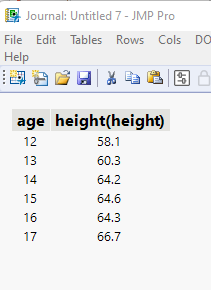
names default to here(1);
dt=// Open Data Table: big class.jmp
// → Data Table( "big class" )
Open( "$SAMPLE_DATA/big class.jmp" );

// Create the Tabulate Table, and save it as a data table
(tab = dt << Tabulate(
 Change Item Label( Statistics( Mean, "height" ) ),
 Show Control Panel( 0 ),
 Add Table(
  Column Table( Statistics( Mean ), Analysis Columns( :height ) ),
  Row Table( Grouping Columns( :age ) )
 )
) )<< Make Into Data Table;

// Close the
thetable =  current data table();
tab << close window;

// Only character fields can be justified, so change the 2 numeric columns to character
thetable:age << data type(character);
thetable:"height(height)"n << data type(character);

// Move the table to a journal, and close the table
thetable<<JOURNAL></JOURNAL>
