How to center columns in Tabulate?Hello All!
I am a fairly new user and would love to know if we can center the columns when we are using the "Tabulate" function.
I have tried:
- highlighting/right clicking
- adjusting the properties to "center"
- looking at the format settings
- input "center" into the "Set Format( Uniform Format ( 10, 1 ) )" and adding ",center"
- looking at my overall JMP preferences-->Tables
Thank You!
Mass CustomizationRe: How to center columns in Tabulate?So I have found a kluge of a work-around. Table Boxes, and their StringColBox() columns do allow justification. Below is a sample sccript that shows the concept.
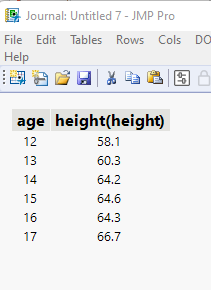
names default to here(1);
dt=// Open Data Table: big class.jmp
// → Data Table( "big class" )
Open( "$SAMPLE_DATA/big class.jmp" );

// Create the Tabulate Table, and save it as a data table
(tab = dt << Tabulate(
 Change Item Label( Statistics( Mean, "height" ) ),
 Show Control Panel( 0 ),
 Add Table(
  Column Table( Statistics( Mean ), Analysis Columns( :height ) ),
  Row Table( Grouping Columns( :age ) )
 )
) )<< Make Into Data Table;

// Close the
thetable =  current data table();
tab << close window;

// Only character fields can be justified, so change the 2 numeric columns to character
thetable:age << data type(character);
thetable:"height(height)"n << data type(character);

// Move the table to a journal, and close the table
thetable<<JOURNAL></JOURNAL>
Re: How to center columns in Tabulate?Welcome to the Discussion Community.
I am not a Super User of Tabulate, so I may not be totally correct in my answer. I checked through all of the messages available to Tabulate (See Scripting Index) and couldn't find anything that would allow the changing of the alignment for the Tabulate cells.
I suggest that you add your ideas to the JMP Wish List
