Data filters that allow grouping - critical for consumer research<meta http-equiv="Content-Type" content="text/html; charset=UTF-8" />Filters that allow grouping (parenthesis) between AND OR. The Boolean algebra is done by computer.
Here is what we do today with grouping: A and (B1 or B2 or … or B10) and (C1 and C2 and … and C10). In JMP, this requires 126 terms instead of 21 terms.
- Alice and I had been trying to accomplish the same complex filter results in JMP as seen in our P&G DR user files. We can do some with subset, filtering, recoding, formulas, and tricks. We hit a brick wall on this one. It goes: A and (B1 or B2 or … or B10) and (C1 and C2 and … and C10). The B group is inversed. This filter just finds empty nesters in a study. Alice tried a long time. I tried for 3 hours in JMP with no luck.
- If you want to do the Boolean Algebra then replace and with * and or with + so A * (B1 + B2 + … + B10) * (C1 *C2 * … * C10). Now do your algebra.
- So the JMP filter is: A and B1 and C1 and C2 and C3 and C4 and C5 and C6 and C7 and C8 and C9 and C10 or A and B2 and C1 and C2 and C3 and C4 and C5 and C6 and C7 and C8 and C9 and C10 or A and B3 and C1 and C2 and C3 and C4 and C5 and C6 and C7 and C8 and C9 and C10 or A and B4 and C1 and C2 and C3 and C4 and C5 and C6 and C7 and C8 and C9 and C10 or A and B5 and C1 and C2 and C3 and C4 and C5 and C6 and C7 and C8 and C9 and C10 or A and B6 and C1 and C2 and C3 and C4 and C5 and C6 and C7 and C8 and C9 and C10 or A and B7 and C1 and C2 and C3 and C4 and C5 and C6 and C7 and C8 and C9 and C10 or A and B8 and C1 and C2 and C3 and C4 and C5 and C6 and C7 and C8 and C9 and C10 or A and B9 and C1 and C2 and C3 and C4 and C5 and C6 and C7 and C8 and C9 and C10 or A and B10 and C1 and C2 and C3 and C4 and C5 and C6 and C7 and C8 and C9 and C10
- I didn’t try to enter the above in JMP. Each letter is a column with certain levels selected.
Re: Data filters that allow grouping - critical for consumer researchHi Jeff,
I am trying to construct a filter formula similar to the one above but using a Multiple Response column. starting with the EmptyNesterfromJMP file that contains the column JMP Filter Formula, I first made a new file copy, EmptyNesterfromJMP Multi, added a Multiple Response column, typstor, to the data table, and copied the Filter Formula column to modifiy the formula. I removed all the "!Contains relp" references. and added a Contains referring to typstor that designates Value Codes 2 and 3 from the list of 9 Value Codes. When I apply this formula,the reults are all zeros.

Wanting to be sure that rows exist to match the criteria chosen, I made a second copy of the Data Filter in the table with only ageadlt and nagep columns. I ran the filter resulting in 672 rows selected and then made a subset table of the selected rows (all columns). I constructed a Categorical of ageadl vs typstor to find how many responses there were for Value Codes 2 and 3. I used the Local Filter to filter by typstor using values 2 and 3, resulting in 160 matching rows. Using Show Subset, I was able to generate a table of all the pertinent. rows. So the data I want to use as a filter exists, but I have not been able to access it through the Formula Editor.

I returned to the main file EmptyNesterfromJMP Multi with the data filter selection of 672 rows still in place, and made the same categorical, using the same filtering criteria. This time the report data matches with the first categorical, but the Local Filter now shows 850 matching rows.

Additionally, when Show Subset is chosen in the Local Filter, a table is generated showing ony the JMP Filter Fornula column.

Any feedbback as to the correct path to setting up a filter formula using a Multiple Response column such as this would be freatly appreciated.
It is not clear to me how to attach the files I am using in this message window, so I will send those to you through email separately.
Thanks,
Alice Ward
Re: Data filters that allow grouping - critical for consumer researchBy the way, although the Contains() function is in the Character functions group it also works on lists.
That's how I'm using it above. The first argument is all the possible values that I'm interested in, in this case {3, 7} for the "Your child..." and "Foster child" values. The second argument is the column I'm testing against. So, in English the Contains functions is answering the question, "Does the list {3, 7} contain the value in the rel#p column?"
-Jeff
Re: Data filters that allow grouping - critical for consumer researchHi Mike,
It was nice talking with you and farris.dd at .
Thanks for sending along the data table explaining the empty nesters filter.
As we discussed, using the Formula Editor will let you create arbitrarily complex filters in the form of a new column that can be used in the Data Filter.
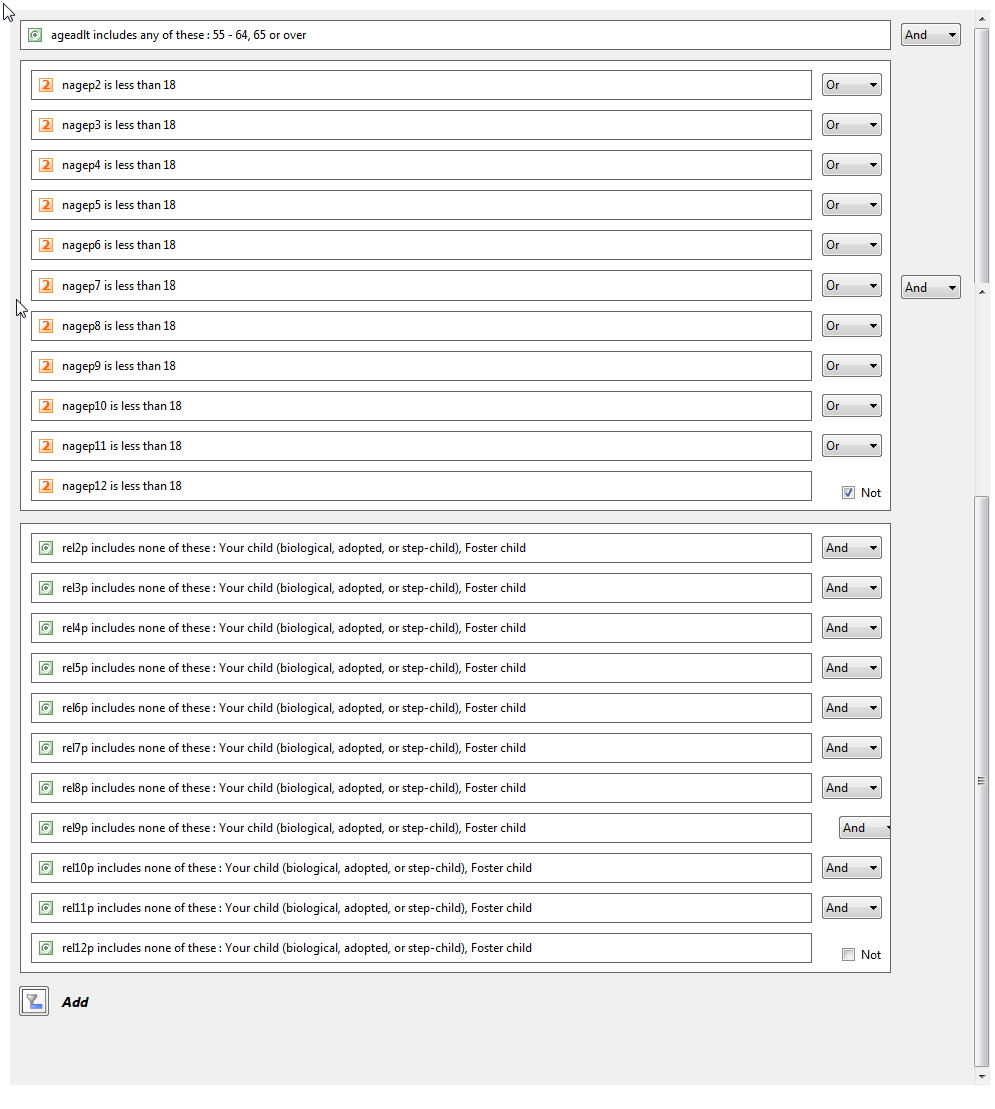
For reference, you also included the following screenshot showing your data filter.
I noted that your filter had a large section of OR clauses for ages < 18 that were negated with a NOT. This is the equivalent to a set of AND clauses for ages => 18.

I'm able to build this pretty easily using the Data Filter in JMP
When you bring the data filter up you'll need to turn off "Auto-clear" from the red triangle at the top. This will let you make multiple selections.
Then add the columns you want to filter on.
Select the 55-64 group and shift-click on the 65 or over group.
For the nagegp# columns you'll need to choose "Select Missing" from the red triangle for each of them. That way rows will be selected if they meet the condition OR they are missing. This is necessary since missing has no numeric value.
Finally, for the rel#p columns select all the relations except the "Your child..." and "Foster child". This is done quickly with the keyboard by clicking any value in the group to put keyboard focus in that group and then hitting Ctrl-A to select all the values and then ctrl-click on the two you want to deselect.
Here's a quick video showing the creation of the filter.

Finally, you can do this and much more complicated filters using the Formula Editor to create a new column in the data table.

In this case, we're able to use the Minimum() function to ensure that the minimum age in the nagep# columns is greater than 18. As John pointed out, you need to include a constant value in the argument to functions to protect against the case where all the other arguments are missing. In this case we include 18.
We can also use the Contains() function with the ! (NOT) operator for the rel#p columns to find the rows that don't contain the "Your child..." and "Foster child..." values.
As I noted above, I didn't have to use an OR operator or any parenthetical grouping for the comparisons, but all of that is available.
I'm attaching the data table that you sent, modified to include the data filter script and the filter column formula.
Let us know if you have any questions or concerns.
You said that you and ward.am.2 frequently made complex data filters. Feel free to post here as you work through any like this in the future and we'll be happy to assist.
-Jeff

