在JSL中使用open()匯入文字檔案時如何排除頁首和頁尾?我的資料在資料開頭有幾個標題行,在資料結尾有頁尾。
頁首和頁尾文字均以識別字開頭! 。
(頁首、頁尾和中間資料的行數各不相同)
具有任意資料的範例(以 .txt 檔案形式提供)
!標題第一行
!標題第二行
參數 LSL USL 單位
電壓0.1-0.5V
電容 0.3 0.7 pF
電阻0.5-9歐姆
! 頁尾第二行
! 頁尾第三行
! 頁尾第三行
我可以使用 open() 以便在匯入文字格式資料時排除頁首和頁尾資料嗎?
我可以使用 open() 匯入數據,保留頁首和頁尾文字(例如匯入表格) dt )。
我還想知道如何提取(到一個新表dt_new )數據,不包括以標識符開頭的頁首和頁腳,例如!.
最後,我想將頁首和頁尾資料保存在dt在一個單獨的表中,說dt_hf。 這個怎麼做?
謝謝。
資料存取回覆:在 JSL 中使用 open() 匯入文字檔案時如何排除頁首和頁尾?這是我認為您需要的一個簡單示例。
Names Default To Here( 1 );
dt = Current Data Table();

headFootList = {};
col1Name = Column( 1 ) << get name;
Eval(
 Parse(
  Eval Insert(
   "For Each Row( If( Contains( :^col1Name^, \!"!\!" ) == 1, Insert Into( headFootList, :^col1Name^ ) ) )"
  )
 )
);

Eval(
 Parse(
  Eval Insert(
   "emptyCount = N Rows( dt << get rows where( :^col1Name^ == \!"\!" ) )"
  )
 )
);
Eval(
 Parse(
  Eval Insert(
   "dt << select where( contains(:^col1Name^,\!"!\!")==1 | :^col1Name^ == \!"\!")"
  )
 )
);
Try( dt << delete rows );

dtHeadFoot = New Table( "Headers and Footers",
 New Column( "Headers and Footers", character, set values( headFootList ) )
);

New Window( "Count of Empty Rows",
<<MODAL></MODAL>回覆:在 JSL 中使用 open() 匯入文字檔案時如何排除頁首和頁尾?@tx尼爾森。 下面是它的樣子。 我想做以下事情
1. 將頁首和頁尾文字分開到一個清單中。
2. 將頁首和頁尾之間除空白行之外的資料分開放入資料表中。
3. 計算資料表中空白條目的數量(它們根據載入的文字檔案而變化)

謝謝。
回覆:在 JSL 中使用 open() 匯入文字檔案時如何排除頁首和頁尾?這是你的數據表的樣子嗎?如果沒有,您能提供樣本資料表嗎?
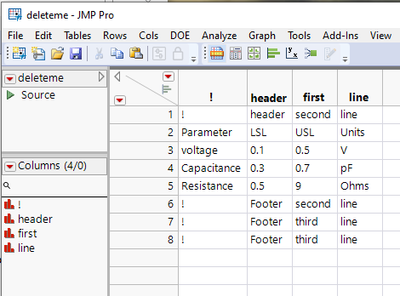
回覆:在 JSL 中使用 open() 匯入文字檔案時如何排除頁首和頁尾?謝謝@Craige_Hales 。
如果我的資料位於資料表中而不是文字檔案中,需要進行哪些變更?
(我加載文本文件並將其命名為 say dt )。
現在我需要將頁首和頁尾與dt。
另外,如何處理頁首和頁尾條目之間的空白行,例如之間的空白頁尾第二行和頁尾第三行並且不將它們包括在數據?
回覆:在 JSL 中使用 open() 匯入文字檔案時如何排除頁首和頁尾?單程:
filename = Save Text File(
 "$temp/deleteme.txt",
 "\[! header first line
! header second line
Parameter         LSL   USL     Units
voltage              0.1    0.5        V
Capacitance     0.3    0.7       pF
Resistance        0.5     9       Ohms
! Footer second line
! Footer third line
! Footer third line]\"
);

lines = Words( Load Text File( filename ), "\!n\!r" );

metadata = {};
data = {};
For( i = 1, i <= N Items( lines ), i += 1,
 line = lines[i];
 If( Starts With( line, "!" ),
  Insert Into( metadata, line ),
  Insert Into( data, line )
 );
);

datafilename = Save Text File( "$temp\data.txt", Concat Items( data, "\!n" ) );
metafilename = Save Text File( "$temp\metadata.txt", Concat Items( metadata, "\!n" ) );
dtData = Open( datafilename, Import Settings( End Of Field( Tab, Spaces, Space ) ) );
dtMetadata = Open( metafilename, Import Settings( Labels( 0 ) ) );
 meta data separated from datameta data separated from data元資料與資料分離
