If you work with JMP, then one of your primary points of contact is through the JMP data table. The data table is exceedingly rich in functionality in order to accommodate all different kinds of data and applications.
My work with JMP as a software tester requires me to try many different data sources with many different settings and preferences. However, I always find myself coming back to my favorite core group of settings and features that I use over and over. You all probably know about the big ones such as Recode, Standardize Attributes and Value Ordering. I'd like to share with you some of the little-known favorites of mine.
Keypad Enter key moves down in JMP preferences. When you find yourself needing to enter data into a JMP data table manually, you might enter by row or by column. JMP assumes you're entering all the data on one row before moving to the next row. I tend to prefer working with columns, so when I press Enter, I want to move to the next row and not the next column. I use this so frequently that this is the first thing I double-check any time I install a new version of JMP.
Quickly adjust to appropriate column widths. Simply press the Alt key (Option key for Macintosh users) and drag-resize to change all column widths at once. I do this all the time since I learned about it a few months ago.
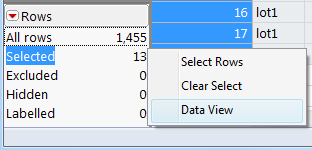
Data View. Especially when working with large data, I often use the Data Filter or other methods to explore. When I need to view a quick subset, I use the Data View. With some subset of rows selected, right-click on the "Selected" item inside the Rows pane (lower left corner) in your data table. You'll see a submenu; choose Data View. A new table displays with just the subset rows showing. For additional fun, this is a linked subset, which means that any change you make in this subtable will also occur in your main table. I find this super-useful for managing my large tables.
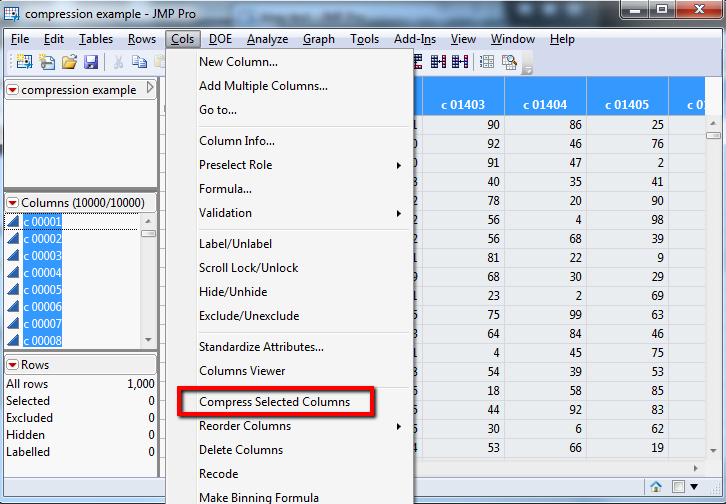
Column compression. Tables with many rows or columns can take up a lot of disk space. In some cases, you can reduce the table disk size (and also the memory consumed by your table) by compressing the space taken up by eligible columns. Select the columns you'd like to compress, then choose
Cols->Compress Selected Columns. JMP will compress the ones it can and leave the rest alone.
These are only a few of the data table gems. What are some of your most-used but perhaps little-known favorites?


