In 2010, esteemed Harvard professors Carmen Reinhart and Kenneth Rogoff published the paper “Growth in a Time of Debt.” It soon became powerful supporting evidence for those who argued against growing government spending, even in times of needed economic stimulation. The paper looked at the debt levels of many different countries over different time spans and concluded that when their debt level reached 90 percent of their GDP, economic growth slowed dramatically. So influential was this report that Rep. Paul Ryan cited it in his 2013 budget.
Then, in April 2013, three economists from the University of Massachusetts at Amherst discovered a coding error in the Microsoft Excel spreadsheet that Reinhart and Rogoff used as a basis for their conclusions. The Harvard professors were quick to admit their error, yet they stated that it would not materially affect the conclusions drawn from the analysis.
While you can certainly argue over whether their conclusions should stand or fall, it is still surprising that the error went undetected – and that policy was based on the analysis. What was not surprising to those who know and even love Excel was that errors can and do happen – often.
Since April 2013, other famous errors involving Excel have been the subject of a number of articles. A recent CNN Money magazine article documented several such errors. The biggest errors resulted in:
JPMorgan Chase’s $6.2 billion trading loss in 2012. The Excel model used to monitor risk involved several manual steps, and one cell added when it should have averaged.
MF Global: About a year before going bust, MF Global never made necessary upgrades to their Excel spreadsheets that monitored risk.
Barclays purchase of Lehman Brothers: An Excel spreadsheet had 200 hidden cells that should have been deleted and removed from the asset list that Barclays had intended to buy. Barclays bought 179 toxic deals as a result.
Utah: Utah's office of education miscalculated the number of students who would enroll in the state's public schools. "A faulty reference in a spreadsheet" resulted in a $25 million budget shortfall.
This is the first in a blog post series that will discuss how using Excel can go from being elegantly simple to increasingly more difficult as data is refreshed or added and as changes are made.
This series will also suggest that there are better tools that are designed to provide more governance of one’s analysis without giving up ease of use and flexibility.
Let's begin with a little history.
Spreadsheets – they changed our lives forever
The history of spreadsheets goes back to batch processors of the 1960s, but we’ll start a little later with the one that first appeared on an Apple®computer in 1979: VisiCalc.
VisiCalc
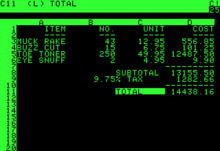
I remember so clearly when a friend showed me his new Apple computer and inserted a 5.25-inch floppy disk that, moments later, displayed VisiCalc on his green-and-black CRT display. (If you have to look up CRT, you are a mere babe in the computing world.)
I was amazed at how fast (a snail’s pace in today’s world) he could change a value and recalculate his results. It was like magic!
According to Wikipedia, VisiCalc went on to become the first killer app, an application that was so amazing that my friend’s company would buy computers just for its use alone.
VisiCalc had a major role in the success of the Apple II computer, and the program later became available for use on other computers popular at the time.
Lotus 1-2-3
In 1983, I was a young systems analyst working for a consumer products company. That’s when Lotus 1-2-3 was released for the IBM PC. I remember seeing it and recommending to my boss that this product would bring us a huge competitive advantage. I said we should purchase three machines with Lotus 1-2-3 loaded on them for our accounting department. My boss was skeptical at first, but I persuaded him. It was one of the best career moves I’ve ever made. Lotus was a big hit and soon beat VisiCalc as the leading spreadsheet product.
Microsoft Excel
Microsoft developed Excel on the Macintosh® platform for several years starting in 1985. The company rewrote the program for Windows 2.0, releasing it in 1987, according to Wikipedia. The release of the Windows version vastly increased Excel's market share. Lotus was never able to regain the market share it lost to Excel, and Microsoft has continued to lead the spreadsheet market.
Spreadsheet users have never looked back. Today Excel is so pervasive and still so easy to use that I have yet to meet anyone who works for any organization in any discipline in the modern world who doesn’t know about it. But, oh, how its use has changed over the years.
In my next post (next Wednesday), we’ll look at the strengths and weaknesses of Excel. In the meantime, do you have any Excel horror stories you can share?


