JMP offers a lot of sophisticated statistical analyses that are easy to use because of its well-designed user interfaces. Nonlinear estimation is not as easy to use because the incredible flexibility of that platform may challenge even a statistically savvy person. However, with JMP Scripting Language (JSL), it is easy to create a simple application that is tailored to the specific needs of an application area and is suitable for fast repeatable usage.
Estimating parameters of nonlinear functions starts with creating of columns within the data table that contain formulae to specify the parameters to be estimated as part of the regression function and a loss function that shall be minimized to find the final regression estimate (if that shouldn’t be done by least squares).
Probit regression is a frequently used analysis for dose response experiments with binary outcomes (response / no response). Its application is thoroughly described in JMP Help and Books, but its usage requires at least a basic mathematical understanding; also, it is tedious to use, especially when needed frequently. The solution here is to write a JSL script. All you need to do is to assign the right variables in your data set to the roles needed for the regression using your typical nomenclature and let JMP do the rest.
The data set needs to contain the columns for dose, total number of items under test and number of items that responded, as you can see in Figure 1: Data.

Figure 1: Data
The JSL script is simple as well. It consists of three parts: the user dialog (Figure 2: Dialog), the insertion of the formula columns and the application of the Nonlinear platform.
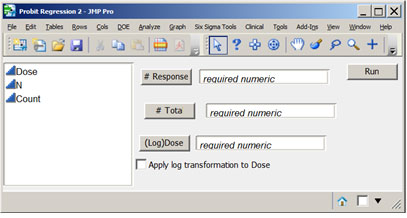
Figure 2: Dialog
You don’t need to write the evaluation statements from scratch because you can do the analysis interactively and save the script to your script window. Then all statements are there, and you only need to substitute the variable names from the program. An additional advantage of the scripting solution is that you can cover specific requests , like the calculation of various inverse predictions. They are automatically generated, and the user doesn’t need to call them from the context menu separately.
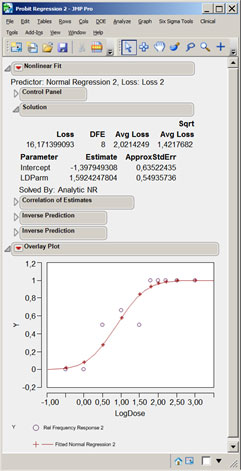
Figure 3: Result
You can distribute and install the whole script as a one-click operation when it is wrapped as an add-in.
You can download this JSL application from the JMP File Exchange.


